
AI-Powered Conversion Audit.Turn visitors into customers.
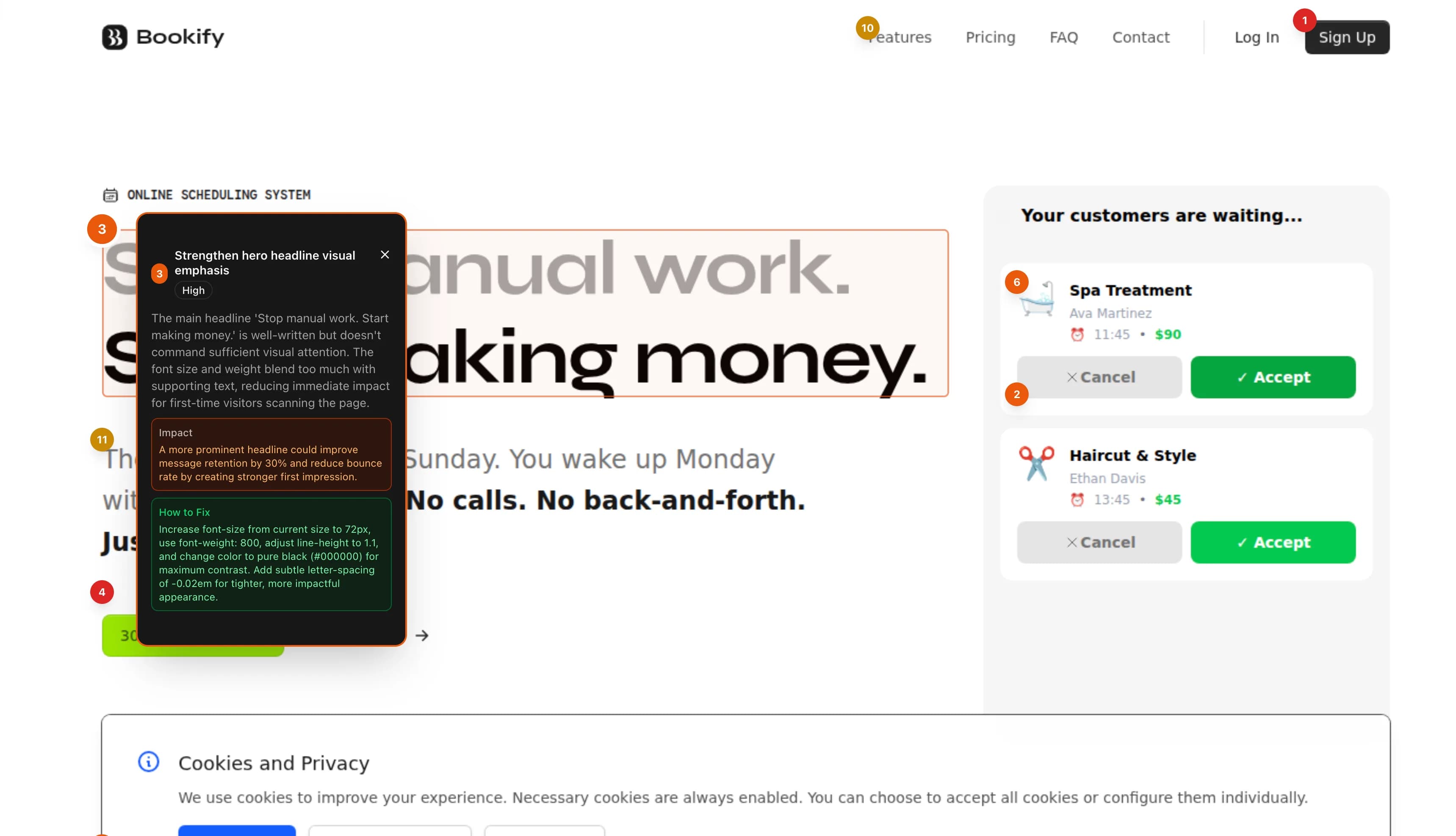
AI reviews your desktop and mobile screenshots like a conversion (CRO) expert — pinpointing what's costing you sign-ups and sales across 12 categories: weak CTAs, unclear value proposition, missing trust signals and friction. Each audit returns priority-ranked fixes on annotated screenshots, 7 sub-scores, and an interactive HTML report.
The AI Conversion audit is a Lifetimefeature ($29.99 once) — run up to 10 audits a month. It isn't part of the free scan or the $3 report.
Conversion Report
example.com
82
UX Score
How It Works
Playwright captures full-page desktop and mobile screenshots. AI then analyzes them across 12 UX categories, returning recommendations with exact element coordinates.
Annotated Screenshots
Desktop and mobile screenshots captured with Playwright, then analyzed by AI. Each issue is marked with precise coordinates directly on the screenshot.
Visual Hierarchy & Layout
Analyze spacing consistency, element alignment, visual balance, and information density. Detect layout issues that hurt readability and conversion.
Mobile Responsiveness
Separate desktop and mobile analysis. Detect touch target sizing, viewport scaling issues, and content adaptation problems on smaller screens.
Navigation & User Flow
Evaluate navigation clarity, CTA placement and visibility, action paths, and conversion element positioning for optimal user journeys.
Visual Consistency
Check color usage, typography hierarchy, font consistency, and overall design polish. Identify inconsistencies that erode user trust.
AARRR Goal Framework
Choose an analysis goal — Acquisition, Activation, Retention, Revenue, or Referral — to get recommendations specifically optimized for your business objective.
7 Sub-Scores
Each audit produces 7 independent sub-scores that combine into your overall UX score.
Visual Design
Color, imagery, and overall aesthetics
Layout & Spacing
Element alignment, whitespace, and grid consistency
Typography
Font choices, sizing hierarchy, and readability
Navigation Flow
Menu structure, breadcrumbs, and wayfinding
CTA & Conversion
Button placement, clarity, and persuasiveness
Accessibility
Contrast ratios, text sizing, and interactive targets
Consistency
Design system adherence and visual polish
12 Analysis Categories
Every recommendation is categorized and priority-ranked (critical, high, medium, low) with specific fix instructions.
Visual Design
- Visual hierarchy and content prioritization
- Typography readability and sizing
- Color contrast and accessibility
- Spacing and layout consistency
Interaction & Flow
- Navigation clarity and structure
- CTA placement and conversion optimization
- Form and input design quality
- User flow and action paths
Responsiveness & Polish
- Mobile responsiveness and adaptation
- Loading performance perception
- Design consistency and polish
- Accessibility contrast compliance